01 What they said
74%
“A room that fits my trip matters more than the price”
Share of respondents · Survey n = 5,200
Agoda
Over 80% of all bookings came from the cheapest room. When I dug into the problem, I found that users were booking the cheapest option right away, without exploring or comparing the other rooms.
I redesigned the Room Selection experience so users could understand and compare rooms by value rather than price, and choose the room that fits them. I led the work from hypothesis through experimentation to global launch.


Background
Most users book the first room they see, which is the cheapest one. On our platform the cheapest room is usually the lowest-margin product, so the more bookings concentrate there, the smaller the business opportunity. I set out to solve this business problem while also uncovering the user problem connected to it.
Room position, sorted by price (low to high) · n = 12M sessions
The Gap
I looked into users' price sensitivity through research.
Most users said that after comparing room types, they would pay more for a room that suits their trip better.
But that intent never carried through to actual bookings.
01 What they said
“A room that fits my trip matters more than the price”
Share of respondents · Survey n = 5,200
02 What they did
Booked a non-cheapest room
n = 12M sessions
Root cause
The survey showed the problem was in how users explore and compare. They couldn't understand the differences between room types or the value of upgrading, so they kept going straight to the cheapest room.
Insight 1
Users couldn't see how room types differed or what an upgrade was worth, so they ended up choosing the cheapest room

Insight 2
Users understood how the rooms differed, but didn't feel the upgrade was worth paying extra for
Survey · n = 5,200 · multiple answers
Reason 1 · Users can't tell room types apart
To find where users struggled while exploring and comparing room types, I ran user interviews and an internal UX audit. This surfaced the core problems blocking their behavior, which then shaped the design direction and hypothesis.
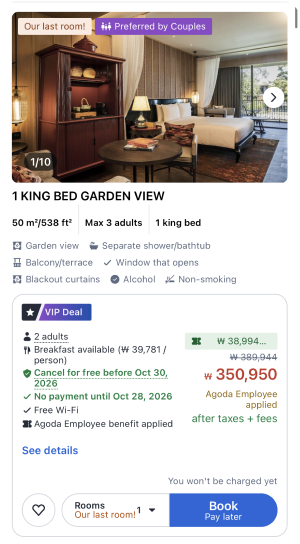
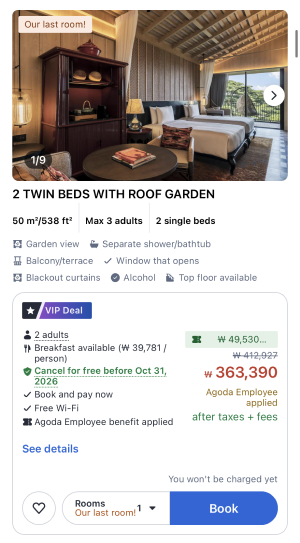
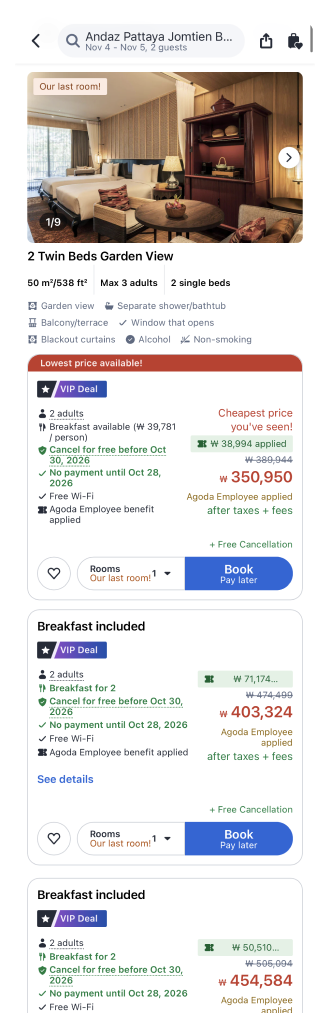
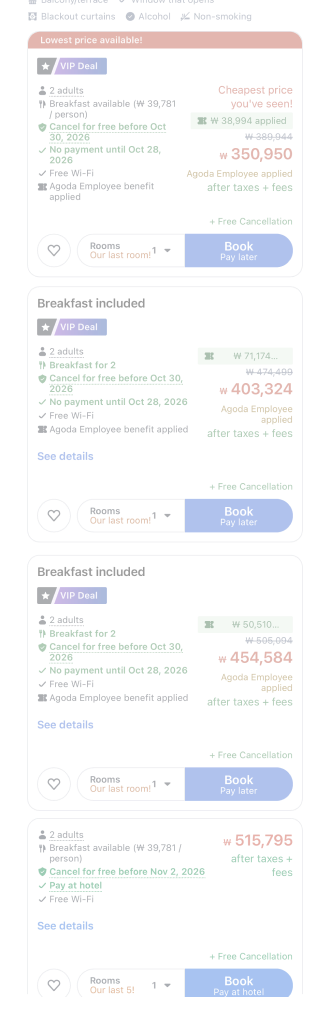
Benefits, discounts, cancellation rules and payment terms pile up at once, so the room difference is hard to spot
Long scroll, so users compare from memory
No basis for the recommendation
Reason 2 · 32% · The upgrade benefit feels small for the price gap
To find the balance between value and price premium, I analyzed which benefits users value most and how much extra over the cheapest room they accept as reasonable. Based on this, I defined the recommendation criteria for when an upgrade feels worth it.
Users valued benefits they can feel right away, like room size or view, more than abstract ones.
Survey · n = 5,200 · multiple answers
Existing booking data showed that 60% of non-cheapest bookings happened at a price premium of 15% or less over the cheapest room.
Booking data · 1 week
Users don't always want the cheapest room.
They upgrade when the value is tangible and the price gap feels reasonable.
Set before the experiments
Rather than giving every user the same experience, I defined a clear goal for each segment. The success criteria followed the segments too: metrics we expected to move were set as Primary, and metrics that had to stay unaffected as Guardrail.
Target segment
They were willing to pay for a better room, but the existing experience didn't give them the information to compare rooms and judge their value.
Primary
Bookings of every room except the cheapest
Protected segment
For them an upsell isn't added value but a distraction. So choosing the cheapest room had to stay exactly as before.
Guardrail
Business
How might we
How might we help users easily explore and compare room types,
so they choose the room that fits them best instead of the cheapest one?
Hypothesis
If we show the value of each room type clearly and make comparison easy,
users will choose a room that fits their needs instead of the cheapest one.
Experiment 1 · Initial validation
Before building complex UI, I tested the hypothesis with the smallest possible design change. The goal was to see whether users respond to a recommended room with valuable benefits at a reasonable price, and whether that interest could turn into actual bookings.
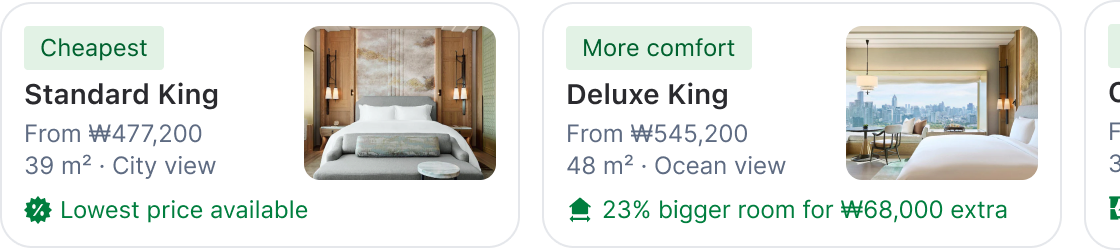
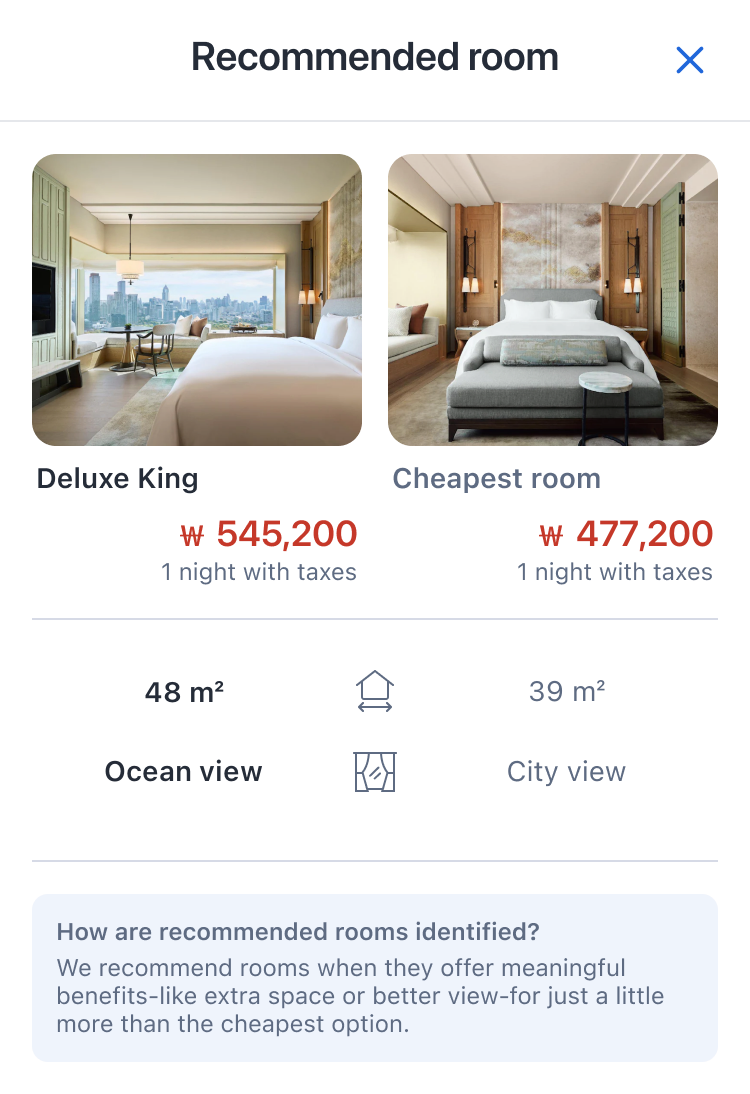
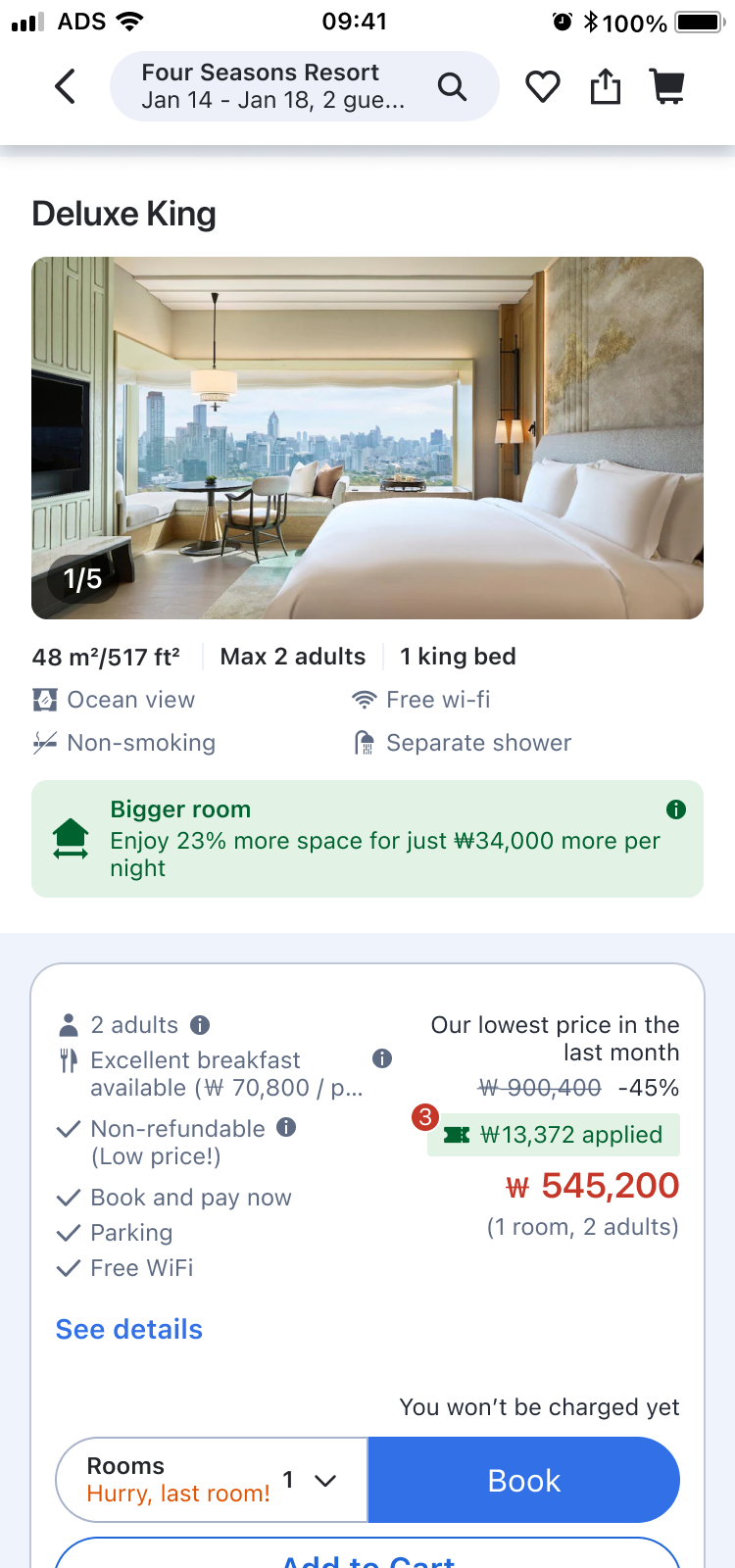
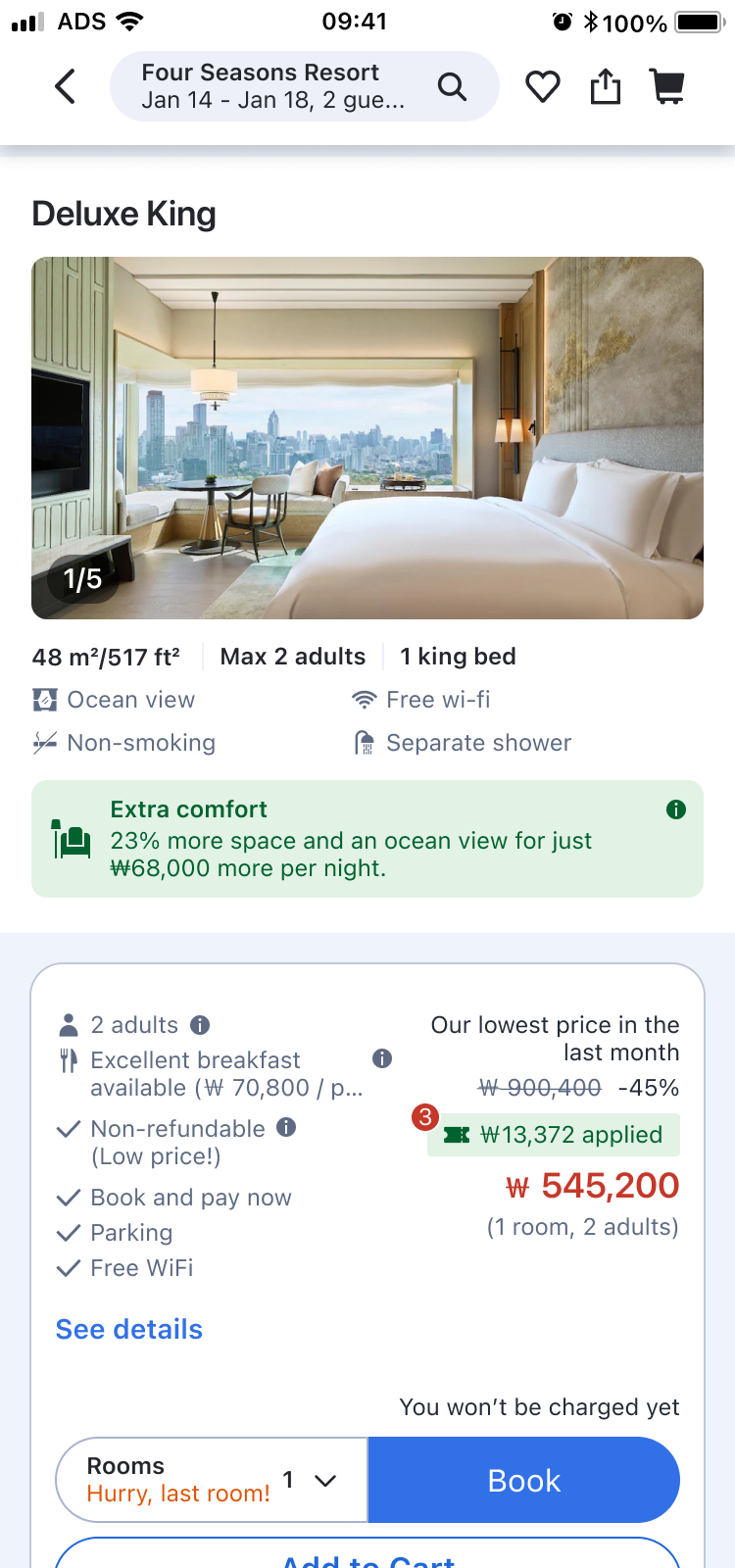
“23% bigger room with ocean view, just ₩68,000 more per night”
I showed room size and view, the benefits users care about most, side by side with the cheapest room, so users could see at a glance how much bigger the room is and what view it offers.
By highlighting the extra cost over the cheapest room, users could easily see what a small price difference gets them.
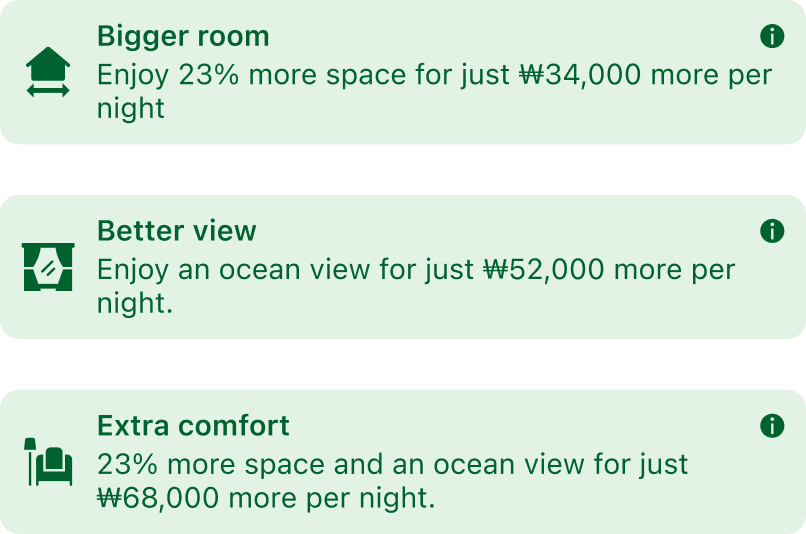
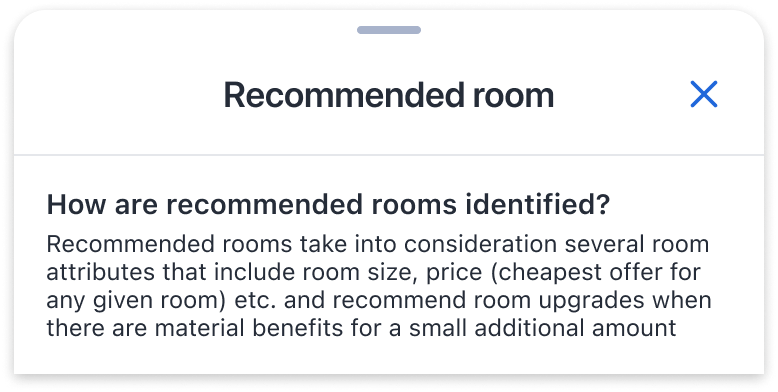
Within the price range users accept (up to +15% over the cheapest room), I recommended rooms that offer highly preferred benefits like view or room size.
The banner click didn't turn into bookings right away,
but it validated interest in the recommended room and the potential of the experience, laying the groundwork for the next experiment
Experiment 2 · Sharpening the hypothesis
Having confirmed interest in the recommended room, I designed a comparison experience for the next step, so users could compare room types directly and understand the value of upgrading.
Hypothesis
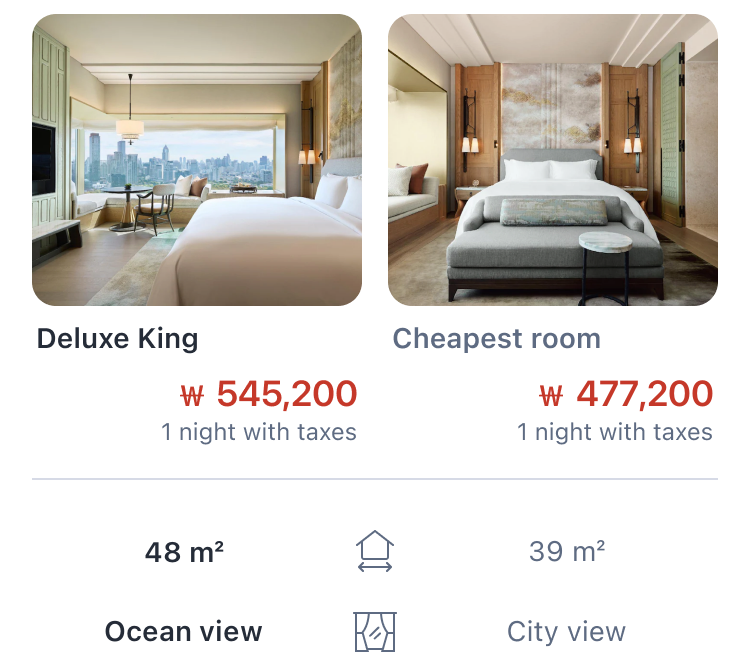
If the recommended room is shown side by side with the cheapest room,
users will easily see the difference and recognize the value of upgrading.
Solution
Tapping the recommended room banner
opens a comparison table with the cheapest room, showing the benefits and price difference at a glance
Experiment 2 · Result
Users who compared room types directly and understood the difference chose the recommended room more often. Not only did interest (CTR) grow, non-cheapest bookings and Long-term Value rose too, validating the hypothesis.
Interest
5.2%Banner CTRBehavior change
+3.1%Non-cheapest booking rateBusiness impact
+9%Long-term valueExperiment 2 · The next problem the data revealed
The comparison worked, but the banner could only reach users who scrolled as far as the recommended room. Most users only looked at the top two rooms in the list and barely explored anything past the third.
| Master room index | Seen rate | Click rate |
|---|---|---|
| 1st room (cheapest, no banner) | 44% | - |
| 2nd room | 22% | 72.76% |
| 3rd room | 19% | 20.56% |
| 4th+ room | 12% | 4.30% |
70% of users
never scroll past the 2nd room
If we surface the recommended room at the top of the list so users can compare it with the cheapest room without scrolling,
more users will reach the comparison and non-cheapest bookings will rise
Experiment 3 · Expanding reach
This iteration aimed to raise the reach of the comparison. If users could compare the cheapest and recommended rooms at a glance without scrolling, more of them would start comparing.
I placed a carousel summarizing the cheapest and recommended rooms at the top of the room list. Tapping a card scrolls straight to that room.
Experiment 3 · Result
Once the validated comparison moved to the top of the list, more users started exploring the recommended rooms. As a result, not only carousel card clicks but also non-cheapest bookings went up.
Impact
Across three experiments, we improved how users explore and compare non-cheapest rooms, and that led to real booking growth. At the same time, the guardrail metrics, cheapest room booking rate and total bookings, held steady. We made a meaningful impact without hurting the experience for price-sensitive users.
Primary
+32%
22% → 29% · +7%p absolute · p = 0.002
Users book non-cheapest rooms when they can clearly see the value
Guardrail
-0.3%
No statistically significant change
A user-initiated pattern doesn't disrupt price-sensitive users
Business
+1,155
Bookings per day · ADR +0.19–0.23%
Upgrades that fit users' needs drive measurable revenue growth
Cumulative average across all experiments
Three experiments
We tested hypotheses fast with small experiments, found new problems in the results, and evolved the solution. Each experiment set the direction for the next.
Experiment 1 · Initial validation
Will users show interest if we show them the recommended room we defined?
Banner CTR 2.3%
→ A clear benefit at a reasonable premium drew interest
Experiment 2 · Sharpening
Will bookings rise if users can easily compare the recommended room with the cheapest one?
Non-cheapest booking rate +3.1%
→ Users upgrade when the value is clear
Experiment 3 · Expanding reach
Will more users choose it if they reach the comparison without scrolling?
Non-cheapest booking rate +2.0%
→ Wider reach raised the non-cheapest booking rate with it
Next step · Offer upsell
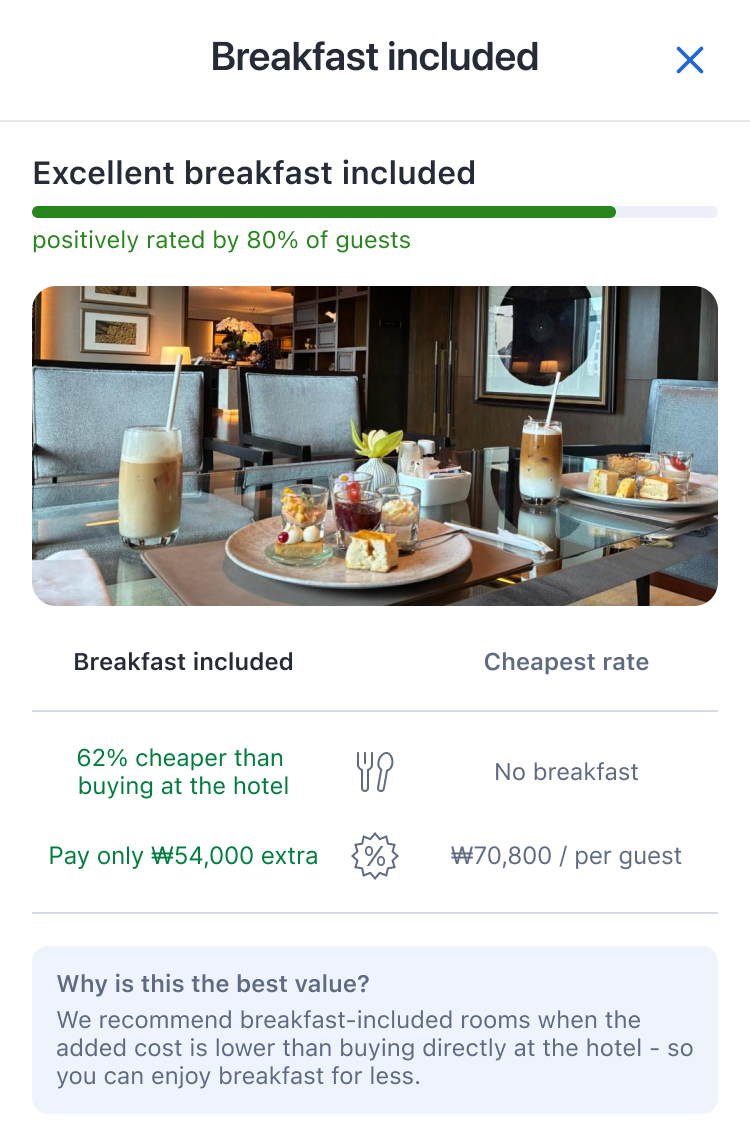
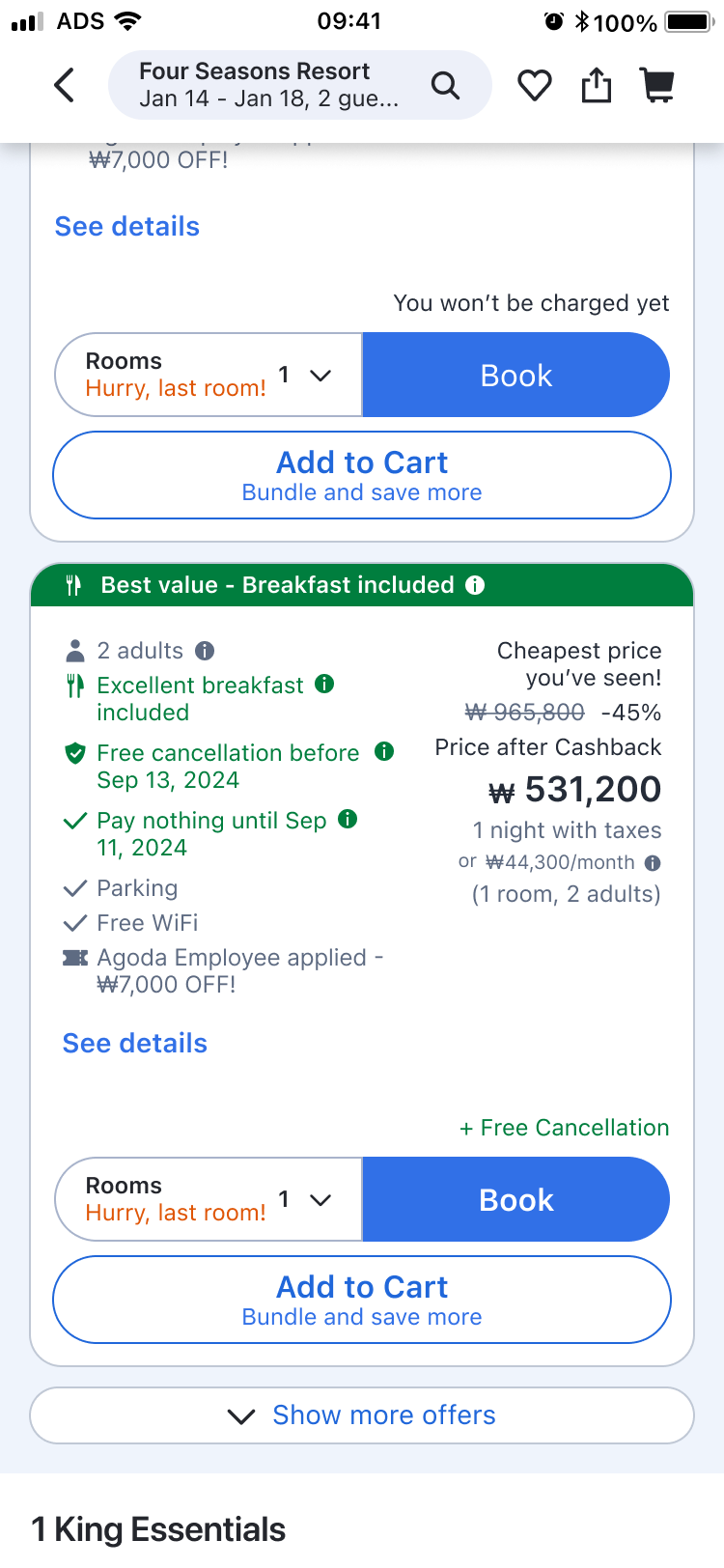
The same problem showed up in offer selection. Users took the cheapest default offer without exploring or comparing, and struggled to see how offers differed or what an upgrade was worth. So we applied the principle we had validated on rooms.
Can the same choice principle work for offer upsell?
| Room · Validated | Offer · Next step | |
|---|---|---|
| Default | Cheapest room | Cheapest offer (non-refundable · breakfast not included) |
| Highlight | Bigger room with a better view | Free cancellation · breakfast included |
| Compare | Side by side with the cheapest room | Side by side with the cheapest offer |
What this project left behind
Clear value + reasonable premium + easy comparison = value-based choice
Rather than trying to find the right answer from the start, I learned fast through small experiments. The early experiments focused on validating direction over big wins, and by iterating the hypothesis and solution on the signals we got, we reached a meaningful result.
Users make better choices when valuable benefits are clear and a comparison is right there. That principle was reused across other upsell projects and teams.